Login with GoPay
A flow where users authenticate using their GoPay account via phone number.
What is Login with GoPay?
Login with GoPay allows users to sign in to a your application using their GoPay account. Authentication is handled by GoPay and uses built-in multi-factor authentication (MFA), including OTP, PIN, and face verification. After successful login and user consent, a secure token is returned to confirm the user’s identity.
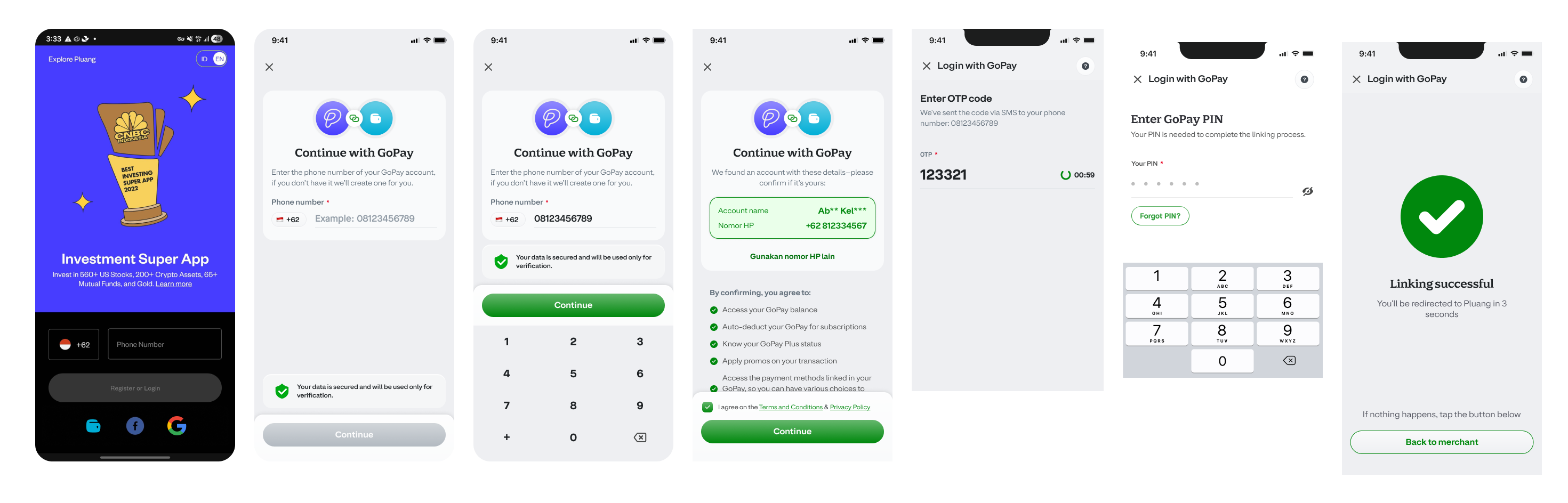
Scenarios of Login with GoPay
Login with GoPay works using an input of a phone number. Based on that we are going to check if a GoPay account exists or not with it and each will have different result.
| Scenario | Condition | Steps Required | Outcome |
|---|---|---|---|
| New User | GoPay account does not exist | OTP verification → Set display name | Account created + Linking Token issued |
| Existing User | GoPay account exists, no PIN set | OTP verification | Linking Token issued |
| Existing User with PIN | GoPay account exists, PIN is set | OTP verification → PIN verification | Linking Token issued |
| GoPay Plus User | GoPay account exists and is KYC-verified | Face Recognition (FR) only | Linking Token issued |
Once the flow is completed, a Linking Token is returned — a permanent token that links the user's GoPay account to your platform. Store this token securely as it will be used for subsequent GoPay interactions on behalf of the user.
Note: The Linking Token is issued only upon successful completion of the required verification steps. Incomplete or failed flows will not produce a token.
Updated about 12 hours ago