
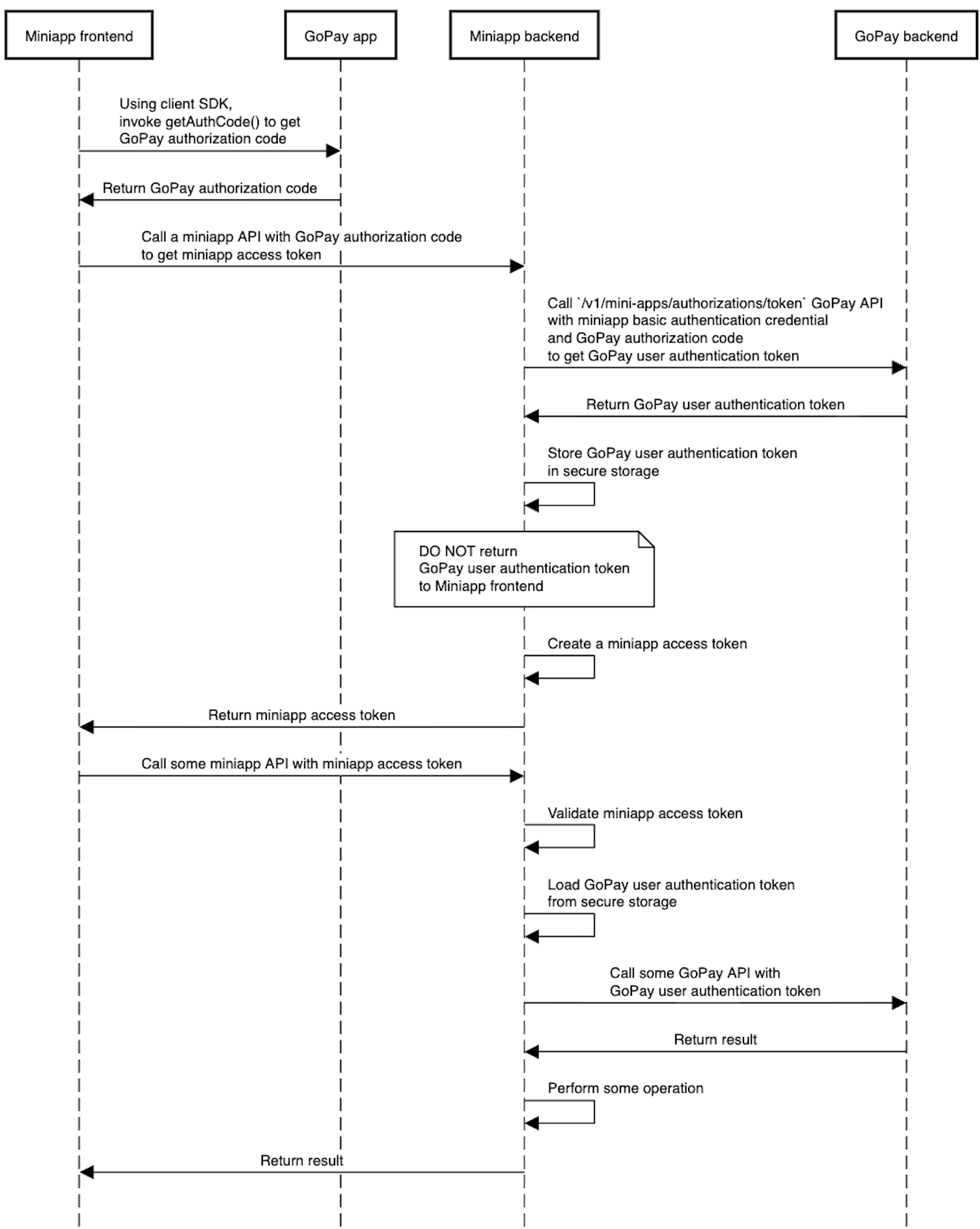
This method explains how to authenticate a GoPay user via the Mini App by first retrieving an auth code from the frontend and then exchanging it for an access token through the backend.
1. Initialize SDK Script
<script src="https://gwk.gopayapi.com/sdk/stable/gp-container.min.js"></script>
WarningThis method initialized the SDK, and only works in GoPay. Not local or browser.
2. Get Authorization Code
This method retrieves an authorization code that can be used to authenticate the GoPay user. It also returns a promise that resolves with the auth code or rejects it in case of failure for some reason.
| Integration Needed | Details |
|---|---|
| Mini App Frontend | Available since: GoPay App Version 1.36.0 |
| Mini App npm SDK Version | Available since: 0.3.19 |
WarningThe authCode is valid for 6 minutes. Please re-call the APIs again if exceed the authCode validity period.
Sample frontend code:
window.gpContainer.call(
  "GPMiniAppAuth",
  "getAuthCode",
  {},
  function(response) {
    console.log('success:', response);
  },
  function(error) {
    console.log('error:', error);
  }
);
Sample Response:
{
    "success": true,
    "data": {
        authCode: "GBNURP5WyBIqXiGxKv2cO8Qj4CyS0qZrRK5O4e8ehdnHpowG6k5pkj2SsF7BqGIF"
    },
		"ret": "GP_SUCCESS"
}{
"success": false,
"error_code": "",
"error_type": "JS_BRIDGE_ERROR",
"error_message": "",
"ret": "GP_EXCEPTION"
}3. Get Authorization Token
The Mini App backend can call this API to obtain an access token using the authCode received from the frontend.
- The authorization token is required for calling other APIs, such as the Reminder API.
- The token does not expire, but if lost, you can request a new one using the same flow (getAuthCode() → access token).
Store the auth_token securely, so it can be used for future API calls. Make sure it is encrypted and access is controlled via RBAC (Role-Based Access Control).
| Integration Needed | Details |
|---|---|
| Mini App Backend | Mini App backend will call to GoPay backend to fetch authorization token. |
| Path | /v1/mini-apps/authorizations/token |
|---|---|
| Host | https://public-mini-app-merchants.gopayapi.com |
| Http Method | POST |
Request Headers:
| Property | Data type | Required | Description |
|---|---|---|---|
| Debug-Id | string | No | This is an identifier that is used for debugging purposes |
| Request-Id | string | No | This is an identifier that is used for maintaining idempotency |
| Authorization | string | Yes | This is a Basic Auth header. Please use the shared AuthCredentials that you received from the team via Email. Format: Basic <credential-received> |
Request Body:
| Property | Data type | Required | Description |
|---|---|---|---|
| auth_code | string | Yes | The code obtained using getAuthCode() interface |
Response:
| Property | Data type | Description |
|---|---|---|
| success | boolean | It will be true if API call is successful and false in case of failure |
| error | object | This object will be non null only in case of failures |
| error.description | string | The description of the error |
| data | object | The object containing the token and account details |
| data.auth_token | string | The auth token for the user |
| data.gopay_account_id | string | The GoPay account id of the user |
Sample Request:
{
  "auth_code": "64RgLs7QHVP9CPMgfhbVRKxyjHNILxWUNrtC1uAmUbxukBk70iqTqpPbcn7INbgB"
}
Sample Response:
Success Response:
{
  "success": true,
  "data": {
    "auth_token": "MjAyNDA5MTdhYjQ1Nzk1NC1lMWQ4LTQ0YzUtYjgzMy1iOGZkYjE1YjU1OTk6NDJmZjAwN2UtZDU1YS00YzQwLTkyMTktZmUwNThhMjUzYjgx",
    "gopay_account_id": "01-0a0de883e1d846568db4c48ff12c5486-26"
  }
}
Error Response: With appropriate HTTP status codes. Only 5xx would be retriable
{
  "success": false,
  "error": {
    "description": "AuthCode Not Found"
  }
}