
Overview
MiniKit CLI is a developer tool for scaffolding and managing the frontend of MiniApp web applications built with React and TypeScript in the GoTo ecosystem. It provides a standard setup with tooling, configuration, and selected internal integrations pre-configured.
Prerequisites & Create
Step 1: Check Your System
Before installing the CLI, make sure the following are in place:
| Requirement | Description | Verification Command | Install |
|---|---|---|---|
| Git | Required for version control and cloning templates. | git --version | If not installed, download it from https://git-scm.com/install/. |
| Bun.js | A fast JavaScript runtime and package manager used to run the CLI. | bun --version | |
Step 2: Install the CLI tool
Run the following command to install the CLI globally and verify that it was installed correctly:
bun install -g @gopay/minikit-cli@latest && minikit-cli --versionStep 3: Run the Create Command
minikit-cli create my-first-projectReplace my-first-project with your project name (lowercase, with hyphens).
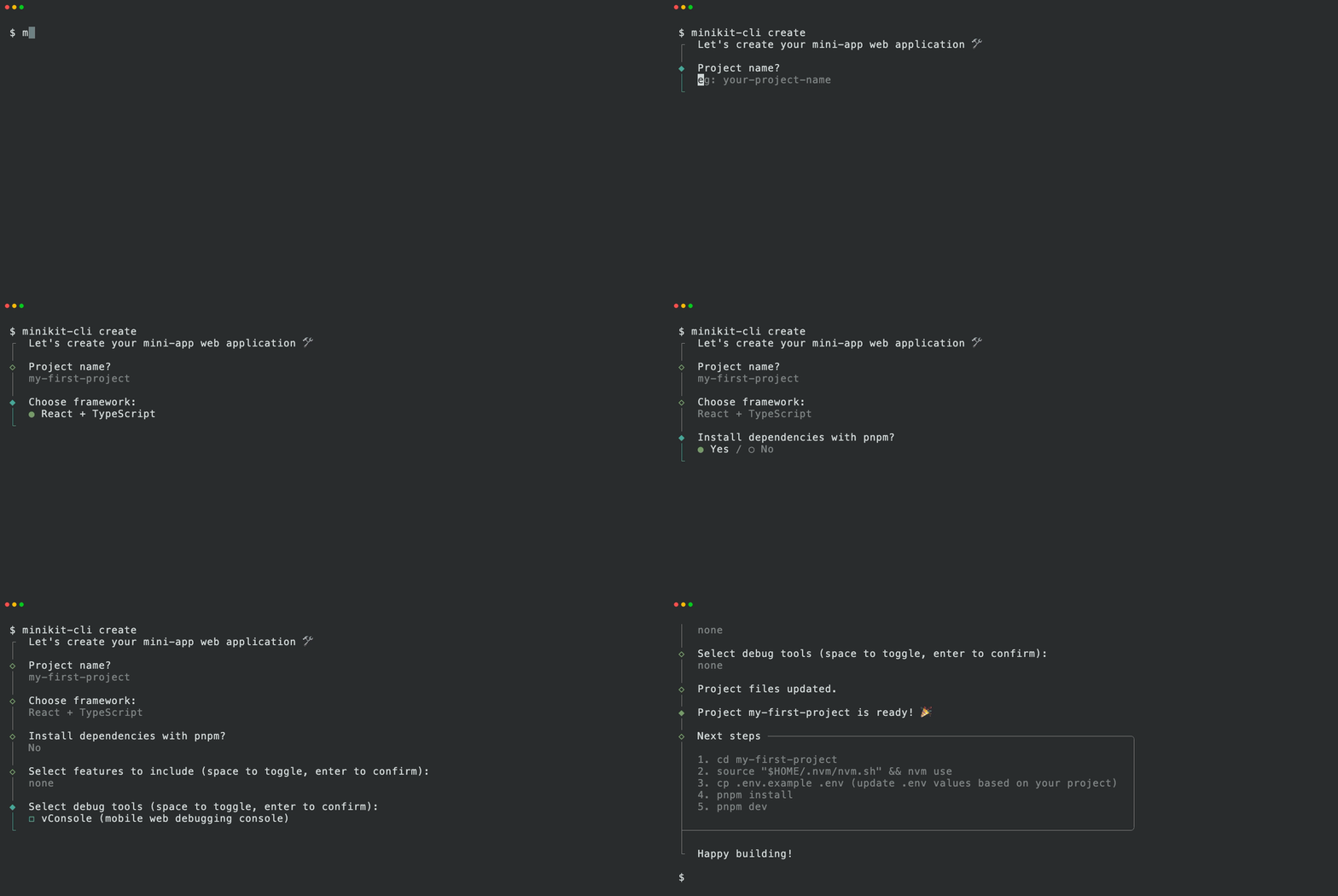
Step 4: Select the Wizard Options
The CLI will ask you a series of questions.
1: Framework
? Choose a framework
  › React + TypeScript
2: Install Dependencies
? Install dependencies with pnpm?
  › Yes
3: Features to Include
? Select features (multi-select, press Space to toggle)
  ◯ Auth
  ◯ i18n (Multi-language)
  ◯ Snap Checkout (Payments)
Choose based on your MiniApp requirement:
| Feature | When to choose |
|---|---|
| Auth | MiniApp requires seamless login. |
| i18n | MiniApp serves users in multiple languages |
| Snap Checkout | MiniApp needs payments integration |
| Debug Tools | Testing MiniApp on physical mobile or debugging in production |
4: Debug tool to Include
? Select Debug Tool (press Space to toggle)
  ◯ vConsole
Step 5: Run your MiniApp
cd my-app
source "$HOME/.nvm/nvm.sh" && nvm use
cp .env.example .env
pnpm install  # If not already done
pnpm dev
Open the url to the browser. You should see the default home page heading "Your Miniapp is ready...".
✅ 🎉 Congratulations! Your MiniApp is running.
Next Step: To open and test the app as a GoPay/Gojek MiniApp, deploy your changes and try it out using the GoPay/Gojek app.
Technical Support
https://docs.midtrans.com/reference/miniapp-v2#technical-assistant-and-support