
HTTP(s) Notification is sent to your server when the merchant creation completes. These notifications help you to take suitable actions in real time. Midtrans will provide a Notification server key to use by Partner to verify the signature.
HTTP Notification
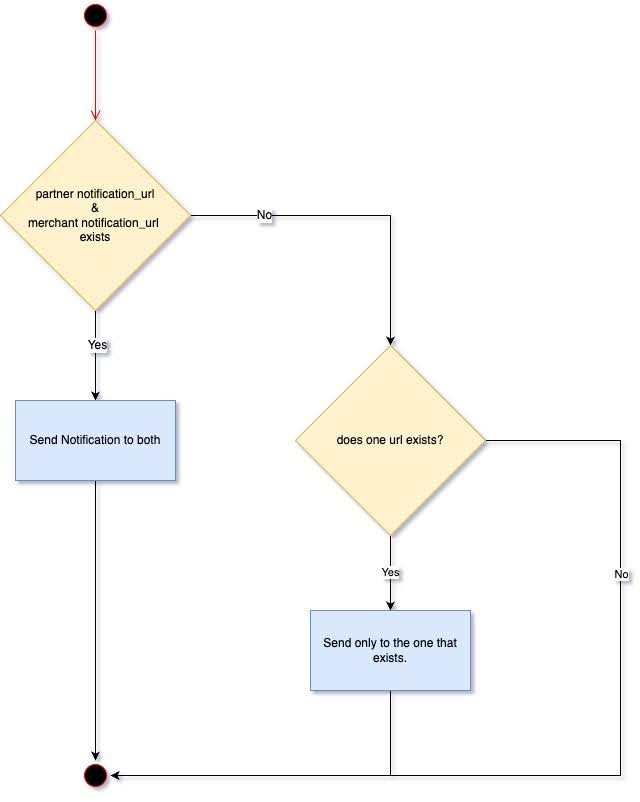
There are 2 types of HTTP notifications that Midtrans sends: to Merchant, and to Partner.
Some sample HTTP notifications for a successful transaction on different payment methods are given below.
| Key | Type |
|---|---|
| Kind | HTTP Request |
| Request Method | POST |
| Request Header | Content-Type: application/json |
| Request Body | String of JSON |
Sample HTTP Notification Gopay Payment Type to Partner
| Field | Type | Description |
|---|---|---|
| transaction_time | String | Time at which the transaction initiated. |
| transaction_status | String | The transaction status of the transaction. For more details, refer to Transaction Status. |
| transaction_id | String | The transaction id of the specific transaction. |
| status_message | String | The status message. |
| status_code | String | The transaction status code. |
| signature_key | String | In the notification response body, Midtrans provides signature_key which is generated by appending order_id, status_code, gross_amount, and PartnerServerKey into a string. PartnerServerKey is confidential information known only to Midtrans and you. Thus, you can verify the signature_key to ensure that the notification is signed by Midtrans. |
| settlement_time | String | Time at which the transaction status was confirmed became "settlement". |
| payment_type | String | The type of payment method used. |
| order_id | String | The order id of the transaction. |
| partner_id | String | Partner ID which initiated the transaction |
| merchant_id | String | Merchant ID which initiated the transaction. |
| gross_amount | String | Total amount for which the transaction was done. number. |
| fraud_status | String | The fraud status of the transaction. |
| currency | String | The unit of currency used for the transaction. |
Sample HTTP Notification Gopay Payment Type to Merchant
| Field | Type | Description |
|---|---|---|
| transaction_time | String | Time at which the transaction initiated. |
| transaction_status | String | The transaction status of the transaction. For more details, refer to Transaction Status. |
| transaction_id | String | The transaction id of the specific transaction. |
| status_message | String | The status message. |
| status_code | String | The transaction status code. |
| signature_key | String | In the notification response body, Midtrans provides signature_key which is generated by appending order_id, status_code, gross_amount, and MerchantServerKey into a string. MerchantServerKey is confidential information known only to Midtrans and you. Thus, you can verify the signature_key to ensure that the notification is signed by Midtrans. |
| settlement_time | String | Time at which the transaction status was confirmed became "settlement". |
| payment_type | String | The type of payment method used. |
| order_id | String | The order id of the transaction. |
| merchant_id | String | Merchant ID which initiated the transaction. |
| gross_amount | String | Total amount for which the transaction was done. number. |
| fraud_status | String | The fraud status of the transaction. |
| currency | String | The unit of currency used for the transaction. |
Transaction Status Definition table
| Transaction Status | Description |
|---|---|
| capture | Transaction is successful and card balance is captured successfully. If no action is taken by you, the transaction will be successfully settled on the same day or the next day or within your agreed settlement time with your partner bank. Then the transaction status changes to settlement. It is safe to assume a successful payment. |
| settlement | The transaction is successfully settled. Funds have been credited to your account. |
| pending | The transaction is created and is waiting to be paid by the customer at the payment providers like Bank Transfer, E-Wallet, and so on. For card payment method: waiting for customer to complete (and card issuer to validate) 3DS/OTP process. |
| deny | The credentials used for payment are rejected by the payment provider or Midtrans Fraud Detection System (FDS). To know the reason and details for the denied transaction, see the status_message in the response. |
| cancel | The transaction is canceled. It can be triggered by merchant. You can trigger Cancel status in the following cases: 1. If you cancel the transaction after Capture status. |
| expire | Transaction is not available for processing, because the payment was delayed. |
| failure | Unexpected error occurred during transaction processing. |
| refund | Transaction is marked to be refunded. Refund status can be triggered by merchant. |
| partial_refund | Transaction is marked to be refunded partially (if you choose to refund in amount less than the paid amount). Refund status can be triggered by merchant. |
| authorize | Only available specifically only if you are using pre-authorize feature for card transactions (an advanced feature that you will not have by default, so in most cases are safe to ignore). Transaction is successful and card balance is reserved (authorized) successfully. You can later perform API “capture” to change it into capture, or if no action is taken will be auto released. Depending on your business use case, you may assume authorize status as a successful transaction. |
Sample of various payment method: here
Verifying Signature Key
In the notification response body, Midtrans provides signature_key which is generated by appending order_id, status_code, gross_amount, and PartnerServerKey/MerchantServerKey into a string. PartnerServerKey/MerchantServerKey is confidential information known only to Midtrans and you. Thus, you can verify the signature_key to ensure that the notification is signed by Midtrans.
The logic to generate or calculate signature_key is explained below:
Partner Server Key:
SHA512(order_id+status_code+gross_amount+PartnerServerKey)Merchant Server Key:
SHA512(order_id+status_code+gross_amount+MerchantServerKey)It basically means append the value of order_id, status_code, gross_amount, PartnerServerKey/MerchantServerKey into one string, then use it as input to SHA512 hash function. Then the output should match with signature_key from notification.
Example Partner Callback
POST https://merchant.com/partner-midtrans-callback
Content-Type: application/json
{
  "transaction_time": "2020-01-09 18:27:19",
  "transaction_status": "capture",
  "transaction_id": "57d5293c-e65f-4a29-95e4-5959c3fa335b",
  "status_message": "midtrans payment notification",
  "status_code": "200",
  "signature_key": "16d6f84b2fb0468e2a9cf99a8ac4e5d803d42180347aaa70cb2a7abb13b5c6130458ca9c71956a962c0827637cd3bc7d40b21a8ae9fab12c7c3efe351b18d00a",
  "settlement_time": "2020-01-10 18:27:19",
  "payment_type": "credit_card",
  "order_id": "Postman-1578568851",
  "partner_id": "123456",
  "merchant_id": "G141532850",
  "gross_amount": "10000.00",
  "fraud_status": "accept",
  "currency": "IDR"
}
Example Merchant Callback
POST https://merchant.com/merchant-midtrans-callback
Content-Type: application/json
{
  "transaction_time": "2020-01-09 18:27:19",
  "transaction_status": "capture",
  "transaction_id": "57d5293c-e65f-4a29-95e4-5959c3fa335b",
  "status_message": "midtrans payment notification",
  "status_code": "200",
  "signature_key": "16d6f84b2fb0468e2a9cf99a8ac4e5d803d42180347aaa70cb2a7abb13b5c6130458ca9c71956a962c0827637cd3bc7d40b21a8ae9fab12c7c3efe351b18d00a",
  "settlement_time": "2020-01-10 18:27:19",
  "payment_type": "credit_card",
  "order_id": "Postman-1578568851",
  "merchant_id": "G141532850",
  "gross_amount": "10000.00",
  "fraud_status": "accept",
  "currency": "IDR"
}
For these three types of HTTP notifications, please contact us directly to request setup assistance.
| Field | Type | Description |
|---|---|---|
| partner_id | String | Partner ID which initiated the action. |
| timestamp | String | Time at which the sub merchant was created / product was activated / payment method was activated. |
| status | String | The action status code (active \ |
| sub_merchant_id | String | Sub Merchant ID which affected by the transaction. |
| product | String | The affected product initiated by the action. |
| payment_method | String | The affected payment methid initiated by the action. |
| signatureKey | String | In the notification response body, Midtrans provides signatureKey which is generated by appending partnerId, partnerServerKey, notificationBodyString into a string then hash with SHA512. PartnerServerKey is confidential information known only to Midtrans and you. Thus, you can verify the signatureKey to ensure that the notification is signed by Midtrans. |
Example HTTP Notification Sub Merchant Creation
Content-Type: application/json
{
  "partner_id": "706",
  "timestamp": "2025-02-28T04:41:31Z",
  "status": "active",
  "sub_merchant_id": "G890500052",
  "signatureKey": "021ad6d19a1007bb39b616b6d2719705c2fca969fc5fb2316f7a01f52c7a05608fdf6ba17779e9d458ca8bb9ae6981b3ceecd83d28e4987b2f20d0272d56daf4"
}
Example HTTP Notification Product Activation
{
  "partner_id": "706",
  "timestamp": "2025-02-28T04:41:38Z",
  "product": "IRIS",
  "status": "active",
  "signatureKey": "7b8d1e2613d275b20353bf3a3bd89ce347af614a021c98ab8685f010501a957c555e9989df684fbb2a47f11c10acf321d8118d446e9986246ede6441478169a4"}
Sample HTTP Notification Payment Method Activation
{
  "partner_id": "706",
  "timestamp": "2025-02-28T04:41:35Z",
  "status": "active",
  "payment_method": "BNI",
  "signatureKey": "416634dbc43c987b73fefa95a2f57d48606e667e409a43ab0122289ef48879e6c0ccd41a518d357cbb4e2c011d1ad6d32e712c901c25f745d55adf7b4afd0007"
}